Tutoring invoice software turns the lessons you've already taught into invoices, so you don't retype dates, rates and totals each month. TutorFlow builds drafts from your completed lessons, emails each family a PDF with your bank details, numbers them automatically and sends payment reminders until the invoice is paid.
The invoicing problem in a tutor's week
Most tutors don't struggle with the teaching. They struggle with the Sunday night admin. You scroll back through your diary, count how many lessons Mia had this fortnight, check whether Thursday's was cancelled, copy last month's invoice in Word, change the dates, fix the total and hope the invoice number is right.
Then a week later you check your bank app, work out who hasn't paid and write a polite nudge. Across 15 or 20 families, that's hours a month you aren't paid for.
Good invoicing software for tutors should remove three jobs:
- Working out what to bill. It should already know which lessons happened.
- Making and sending the document. One press for everyone, not one file per family.
- Chasing. Reminders should go out on their own, politely, and stop when the invoice is paid.
How invoicing works in TutorFlow
Invoices come straight from your calendar. Only lessons marked Completed are billed, and TutorFlow marks finished lessons completed for you (unless you set a different status by hand). A lesson can only ever be billed once, so you can't double-charge a family by accident.
Invoice every family at once
- Go to Invoices and press Generate invoices.
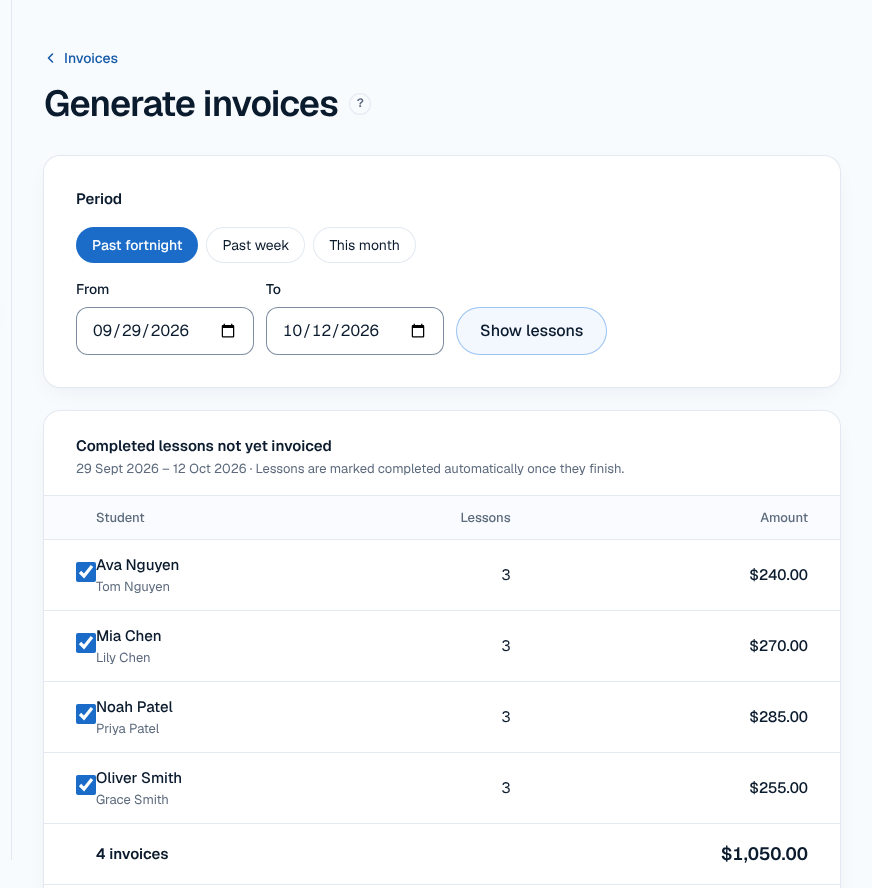
- Pick a period: Past week, Past fortnight, This month, or your own From and To dates. Press Show lessons.
- You'll see each student, how many completed lessons they had and the amount. Untick anyone you don't want to bill yet.
- Press Create draft invoices. Nothing is sent at this point.
- Check the drafts, then press Send all.
If Ava had three lessons at $80, her draft says $240.00 without you touching a calculator.
Invoice one student
Need a one-off? Press One-off invoice (or Create invoice on the student's page), choose the student and the date range, and press Create draft. You can change the due date, the lines and the notes before you press Send now.
What parents receive
Each family gets an email with the invoice as a PDF and a View invoice button that opens a secure private link. There's no account or app for parents to set up.
The invoice shows:
- Your bank details (account name, BSB and account number), with the invoice number to use as the payment reference.
- A Pay by card button, if you've connected your own Stripe account.
- The lessons, dates and total. Your rates are entered GST-inclusive, so what you type is what the family pays.
Once sent, an invoice can't be edited, so the parent's copy and your records always match.
Details that matter
Bank transfer or card
Bank transfer is always available and TutorFlow takes nothing from it. When the money lands, open the invoice and press Mark as paid….
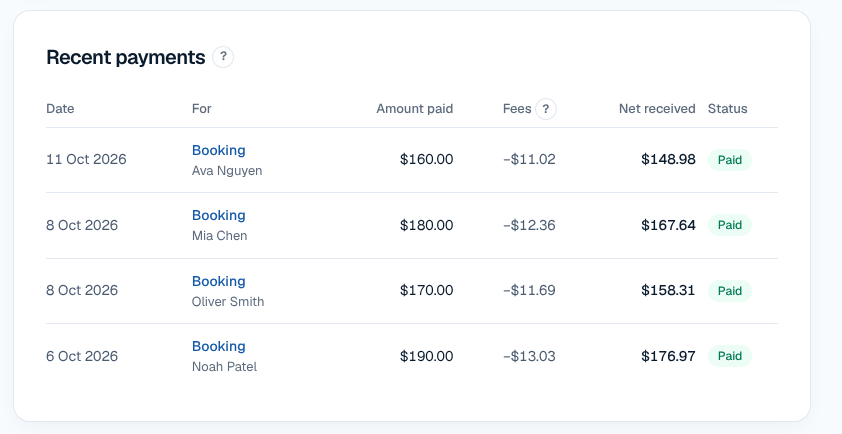
Card payments are optional and go through your own Stripe account. TutorFlow's admin fee is 5% per card payment, and Stripe charges its own processing fee (1.7% + 30c for domestic cards) directly to your Stripe account. Card payments mark the invoice paid automatically. The payments list shows the amount paid, the fees together and what you received.
Reminders and late fees
In Settings, under Payment reminders, choose reminders before the due date (for example 3 days and 1 day before) and how often to remind after it (every 3 days, every week or every 2 weeks). Reminders go out at about 9 am your time, stop when the invoice is paid, and you can stop them for any single invoice.
You can also turn on a late fee in Settings › Invoicing. It's added once, the day after the due date, on its own line, and you can waive it per invoice. For ideas on preventing late payment in the first place, see our guide to getting parents to pay tutoring invoices on time.
Numbering, due dates and archiving
Invoice numbers are assigned automatically with your chosen prefix (INV-0001, INV-0002 and so on). Due dates can be 7 days, 14 days or a custom number, and paid invoices can be archived automatically.
Prepaid lessons are left off
If you use online booking, families pay when they book. Those lessons are left off invoices automatically, so nobody is billed twice.
Who it suits, and honest limits
TutorFlow suits independent tutors in Australia who bill families weekly, fortnightly or monthly for regular lessons and want invoicing tied to their calendar. If you also want the lessons themselves organised, see tutor scheduling software.
What it doesn't do:
- No accounting, BAS lodging or Xero integration. Export what you need for your accountant from your records.
- No parent accounts or app. Families use secure links in their emails.
- No team or multi-tutor billing yet (the Team plan is coming soon).
If you're still deciding what an invoice should contain, our guide on how to invoice tutoring clients covers ABNs, GST and payment terms.
Frequently asked questions
Does TutorFlow charge a fee on bank transfers?
No. Bank transfers go straight from the family to your bank account, so TutorFlow takes nothing. The invoice shows your BSB and account number with the invoice number as the reference. When the money arrives, you open the invoice and press Mark as paid. Only card payments, which are optional, carry TutorFlow's 5% admin fee plus Stripe's own fee.
Can I invoice all my students at once?
Yes. Press Generate invoices, choose a period such as the past fortnight or this month, and TutorFlow lists every student with completed lessons that haven't been billed. Untick anyone you want to skip, create the drafts, check them, then press Send all. Each family gets its own invoice email with a PDF and a secure link.
What if a lesson was cancelled?
Only lessons marked Completed go on invoices. A cancelled lesson stays on your calendar as Cancelled and is never billed. Finished lessons are marked completed automatically, but if you set a status by hand afterwards, your choice is kept. A lesson can only appear on one invoice, so you can't charge for it twice.
Can I change an invoice after sending it?
No. Sent invoices are locked so the copy the parent received always matches your records. That's why every invoice starts as a draft: you can change the bill-to name, email, issue date, due date, lines and notes freely, and nothing reaches the family until you press send.
How much does TutorFlow cost?
TutorFlow is free for a month (card required), then $12.50 a month for the first 12 months, then $25 a month or $250 a year. Prices are in AUD and include GST, and you can cancel anytime. Invoicing, scheduling, reminders and online booking are all included in that price.