An online booking system for tutors lets parents choose lesson times from your free slots and pay before the lesson, instead of you swapping texts and chasing invoices. In TutorFlow, each family gets a private booking link by email each week or fortnight. They pick times, press Pay and book, and the lessons go straight into your calendar.
The booking problem in a tutor's week
For tutors with flexible students, every week starts with the same back-and-forth. "Can Noah do Thursday?" "Only after 5." Meanwhile another family wants Thursday too, and you're trying to remember what you've already offered.
If families pay after the lessons, you carry the risk of late payment and no-shows. Prepaid lessons fix that, but collecting each payment by hand is its own admin job.
A good tutor booking app should do three things:
- Only offer times you're actually free, with breaks between lessons.
- Take payment when the parent books, so the lesson is paid before it happens.
- Handle changes by your rules, including refunds, without you sending money back by hand.
How online booking works in TutorFlow
TutorFlow calls this Booking (prepaid lessons). It runs through card payments, so you'll connect your own Stripe account first.
1. Set your availability and rules
The first time you open Booking, TutorFlow walks you through the settings one step at a time. After that they live under Booking › Booking settings.
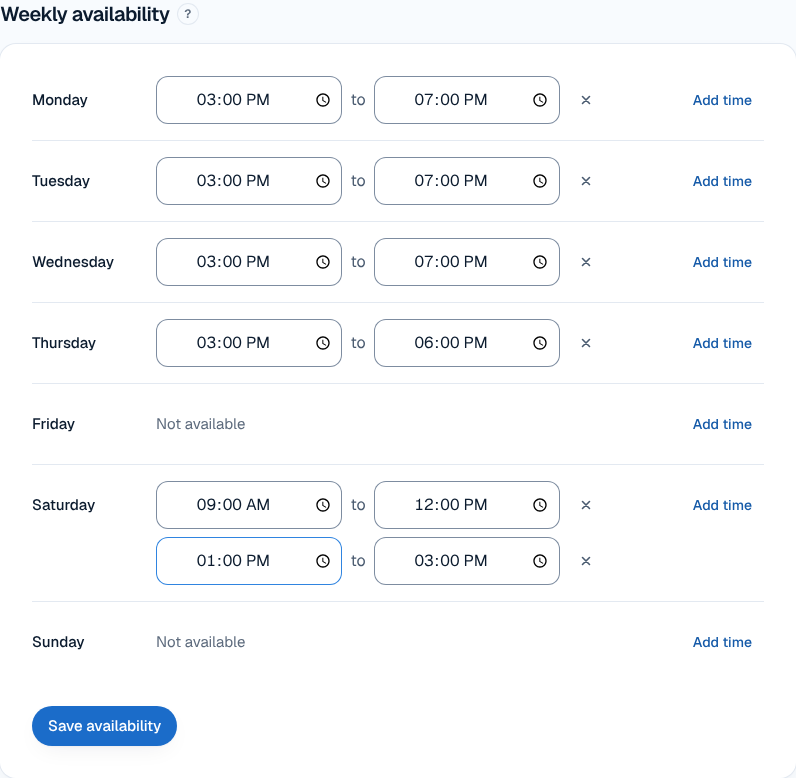
- Weekly availability: press Add time on each day you teach and set the hours. Add a second block for a break.
- Booking rules: the lesson lengths parents can choose, the Booking period (one week or two weeks at a time), the Gap between lessons, how often lessons can start (every 30 or 15 minutes), Minimum notice and how far ahead bookings open.
- Cancellation policy: your own wording, shown to parents before they pay.
- Days off: add holidays and they disappear from the available times.
2. Send each family their booking link
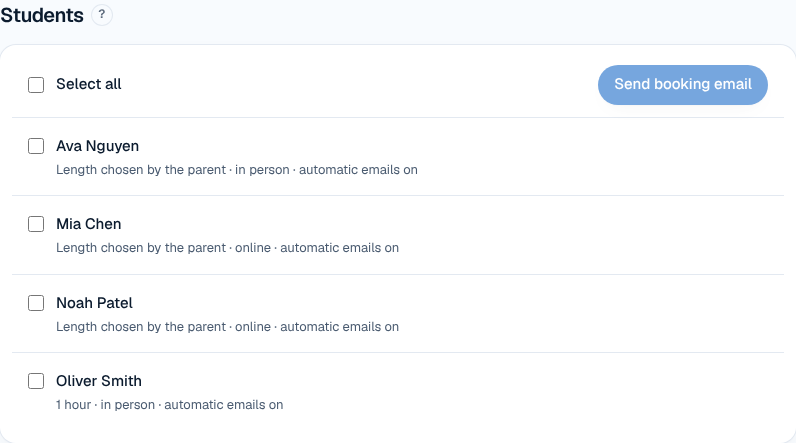
On the Booking page, tick the students and press Send booking email. Or turn on Email booking links automatically and choose the day and time (the default is Sunday at 6 pm). Each family gets one email per period, and families who've already booked the whole period are skipped.
Links only travel by email, and each one covers one booking period for one student before it expires.
3. Parents book and pay
The family opens their link, picks a time for each week (or skips a week), reviews the total and your cancellation policy, and presses Pay and book. Their times are held for 30 minutes while they pay by card.
4. The lessons appear on your calendar
Paid lessons show on your calendar as Booked & paid. You get a "New booking" email, and the family gets a confirmation with a calendar file for their own calendar plus a Manage booking link.
What parents see
Parents don't create an account or download an app. They see your free times in their own timezone, the price, your cancellation policy and a card payment form. After paying, they can move or cancel from Manage booking up to 24 hours before a lesson, and the refund happens automatically. Inside 24 hours, they're asked to contact you instead.
Details that matter
No double bookings
TutorFlow only offers times that are genuinely free. It works around your existing lessons (plus your gap), days off and other families' bookings. If two parents go for the same slot at the same moment, only one can have it.
Fees
Booking payments go to your own Stripe account and are paid out to your bank. TutorFlow's admin fee is 5% per payment, and Stripe's own processing fee (1.7% + 30c for domestic cards) is charged to your Stripe account separately. Your payments list shows the amount paid, the fees together and what you received. When a parent cancels in time, they get a full refund, including TutorFlow's fee.
You stay in control
You can move or cancel a booked lesson at any time from the Booked & paid panel on the lesson. Moving keeps the payment; cancelling lets you choose Full refund or No refund. Both you and the family are emailed every time a booked lesson is moved or cancelled. If you need help writing the rules families agree to, see our guide to writing a tutoring cancellation policy.
No double billing either
Prepaid lessons are left off invoices automatically. You can mix booked students and invoiced students, or even both for the same family, and tutoring invoice software in TutorFlow will only bill what wasn't already paid.
Who it suits, and honest limits
Online booking suits tutors whose students book week to week, tutors with flexible hours, and anyone tired of late payments. Paying upfront is one of the most effective ways to get parents to pay on time, because there's nothing left to chase. Students on a fixed weekly slot may be simpler to keep on regular scheduled lessons and invoice.
What it doesn't do:
- No public booking page or marketplace that finds you new students. Links go to families you've already added.
- No bank transfer at booking. Booking is paid by card; bank transfer stays available for invoices.
- No parent accounts or app, and no SMS. Everything travels by email.
- Bookings stop while your subscription is paused.
Frequently asked questions
Do parents need an account to book lessons?
No. Each family gets a private booking link by email, covering one week or fortnight for one student. They open it, choose times from your availability and pay by card. Afterwards their confirmation email includes a Manage booking link for moving or cancelling. There's no app to download and no password to remember.
Can two families book the same time?
No. TutorFlow only shows times that are free once your existing lessons, the gap you've set between lessons, your days off and other families' bookings are taken into account. While a parent is paying, their chosen times are held for 30 minutes, so another family can't take them in the meantime.
What happens if a parent cancels?
Parents can cancel from their Manage booking link up to 24 hours before the lesson, and the refund is processed automatically, including TutorFlow's fee. Within 24 hours they're asked to contact you instead. You can cancel any booked lesson at any time and choose a full refund or no refund. Both sides are emailed.
What does online booking cost?
Booking is included in your TutorFlow subscription. Each payment carries TutorFlow's 5% admin fee and Stripe's own processing fee (1.7% + 30c for domestic cards), charged to your Stripe account. The subscription is free for a month (card required), then $12.50 a month for the first 12 months, then $25 a month.
Will booked lessons also appear on invoices?
No. Lessons a family booked and paid for online are marked Booked & paid and left off invoices automatically, so a family is never charged twice. You can still invoice the same family for other lessons that weren't booked online, such as a regular weekly slot you scheduled yourself.